Wayback Endpoints: In‑browser discovery of a site's archived endpoints
Wayback Endpoints, by Şahnur Eren Aloğlu, is a Chrome extension that helps researchers and developers uncover historical web endpoints and archived URLs for analysis and recovery work. The extension performs in‑browser historical lookups and provides lightweight result controls and quick export options to speed investigations. Its design helps recover lost assets and map previous site structure during audits and reconnaissance, aimed at technical users rather than casual browsing.
What is Wayback Endpoints used for?
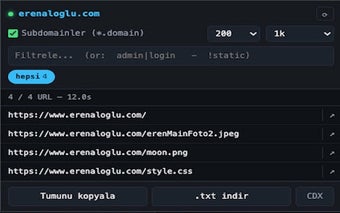
Wayback Endpoints targets technical research tasks: the tool queries the Internet Archive to assemble a domain's past URL surface so users can locate forgotten paths, legacy API endpoints, or deleted files. It is positioned for reconnaissance, site‑migration analysis, and digital forensics, helping practitioners turn archive records into actionable lists rather than requiring manual Wayback searches.
How quickly does it return archived endpoints and how is it integrated?
The extension uses the Wayback Machine's CDX API to fetch indexed snapshots, which produces broader, more exhaustive results than a plain web search of the archive. Its lightweight browser integration and minimalist interface keep the query-and-review loop local to the browser, making it practical to run repeated lookups during an investigation without invoking external scripts.
What privacy model does the extension follow?
The developer discloses that the extension implements a privacy-first approach and does not collect or transfer user data, nor does it share results with third parties. That explicit non-collection policy reduces exposure when the extension is used in sensitive audits, letting researchers query historical records without adding telemetry from their side.
How does it fit into researcher workflows and cross-browser use?
The tool includes focused controls suited to technical workflows: status-code filtering, file-extension filtering, and a click-to-copy mechanism for rapid export to other tools. It is available for Chrome and other Chromium-based browsers, so practitioners who work across multiple Chromium clients can use the same extension without switching platforms. The extension's niche focus aligns it with specialist toolchains rather than general browsing setups.
Practical, specialist tooling that suits technical audits but not casual use
Wayback Endpoints is a practical option for security researchers, SEO analysts, and developers who need historical endpoint visibility in their browser; its focused design means it serves a narrow, technical audience rather than general users. For safe use, treat discovered URLs as historical references and validate any interaction with archived endpoints in an isolated test environment before active probing.